Edit.
Optimize.
Deliver.
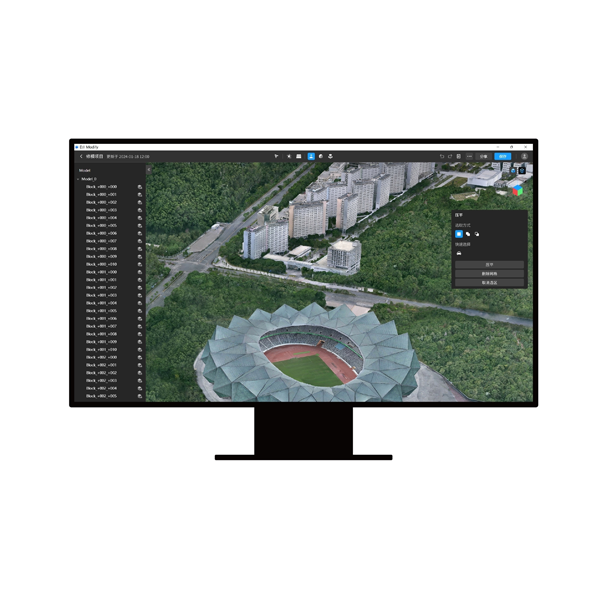
The first intelligent 3D editor from DJI — the “Photoshop for professional 3D models”. AI-powered auto-repair with one click for mesh defects (floating objects, holes, vehicles, irregular water surfaces), point cloud management up to 4.2 billion points, export in PLY/OBJ/B3DM and LAS/PNTS/PCD/S3MB. Seamless integration with DJI Terra V4+ for end-to-end workflow from data acquisition to final deliverable. Flagship Permanent license: €3,610 VAT included (or €79.83/month with Grenke lease).
Standalone, Terra+Modify Bundle,
or progressive upgrade
DJI Modify has a single Flagship Permanent SKU, but three different purchase paths depending on your starting point: Modify only if you already have Terra Flagship V4+, bundle with Terra to start from scratch with the complete workflow, or progressive upgrade if starting from Terra Standard. We help you pick the most cost-effective path.
Modify Standalone
For those who already have a DJI Terra Flagship V4.0.0+ license active. Modify integrates into the existing Terra workflow with one click and immediately adds all auto-repair and mesh cleanup features.
€3,610.00/permanent- Requires DJI Terra V4.0.0+ Flagship
- Permanent license, no expiration
- 1 device (unbinding 1×/year)
- Grenke lease: €79.83/month
- 1-click Terra integration
- DroneBase technical support included
Terra+Modify Bundle
The complete package for those starting from scratch: DJI Terra Flagship Permanent (photogrammetry + 3D + LiDAR + Gaussian Splatting) + DJI Modify Flagship Permanent (advanced 3D editing). The professional end-to-end workflow.
€13,068.01/permanent bundle- DJI Terra Flagship Permanent included
- DJI Modify Flagship Permanent included
- Gaussian Splatting AI
- Terra multi-device up to 10 workstations
- Complete workflow acquisition → export
- Both licenses permanent
Progressive upgrade
If you have Terra Standard 1 Year or Permanent, the most economical path is first upgrading to Flagship (€6,151) and then adding Modify (€3,610). Total lower than the bundle but preserves all your existing Terra configuration.
€6,151 + €3,610/upgrade- Terra Standard → Flagship upgrade
- + Modify Flagship Permanent
- Total: €9,761 (vs €13,068 bundle)
- Keep existing Terra configuration
- Online upgrade, immediate activation
- DroneBase data migration support
One click,
and the model is ready.
Anyone producing 3D models from drone data knows that the problem isn’t generating them — it’s cleaning them up. Floating objects suspended in mid-air, holes in the mesh where photos were missing, parked vehicles ruining an architectural survey, shattered water surfaces. Cleaning these defects manually in generic software (Blender, 3DS Max, MeshMixer) takes hours of expert work — and remains a bottleneck between data acquisition and client delivery. DJI Modify solves this phase: one AI click removes floating objects, fills holes, flattens vehicles, rebuilds missing textures. The cleaned model comes out ready for the client in minutes, not hours. Prerequisite: active DJI Terra Flagship V4.0.0+ license.
Already have Terra? See what Modify adds to your workflow.
Four corrections,
one click each.
DJI Modify automates the four cleanup operations that weigh most on post-production time: floating object removal, mesh hole filling, vehicle flattening, water surface correction. Each correction is applicable with one click on the entire model or manually on specific areas. You invest the rest of the time on what the client actually notices: final output quality.
Floating object removal
The AI identifies and automatically removes “floating” objects — mesh points suspended in mid-air with no structural connection — typical photogrammetric reconstruction artifacts. With one click they’re deleted while preserving real geometry intact. Textures automatically rebuilt to close the visual gap.
Mesh hole filling
Holes in the mesh (areas not covered by sufficient photos or inadequate viewpoints) are identified and filled algorithmically. The AI interpolates surrounding geometry and reconstructs plausible surfaces maintaining model coherence. Textures merged automatically with adjacent ones.
Vehicle flattening
Parked cars, trucks, construction vehicles in an architectural or cadastral survey are flattened to the ground, leaving the underlying ground texture. Useful for historic building surveys, clean cadastral maps, BIM projects where vehicles present at the time of flight shouldn’t appear in the final deliverable.
Water surface correction
Water surfaces (rivers, lakes, sea, pools) are always reconstructed as fragmented and unrealistic meshes by photogrammetry. Modify automatically detects them and replaces them with uniform flat surfaces. Essential for coastal surveys, flooded quarries, construction sites with water basins.
DJI Modify
in real production
DJI Modify in action on Italian deliverables: engineering firms cleaning up BIM models, cadastral surveying companies preparing maps for public clients, cultural heritage authorities digitally restoring monuments, civil protection modeling areas affected by landslides and emergencies. Operational demo at our Rimini office or personalized webinar with one of your real sample datasets.
Six technologies
for flawless deliverables
Modify combines DJI AI algorithms with professional 3D editing workflows: intelligent auto-repair, algorithmic filling, mesh optimization, texture cleanup, manual selective editing for critical areas, multi-format export compatible with CAD/GIS/BIM. Six technologies designed to reduce time from raw data to final deliverable.
AI Auto-Repair
DJI’s proprietary AI engine that identifies and corrects the four main defects of photogrammetric meshes: floating objects, holes, vehicles, water surfaces. All with one click on the entire model or manual selection on specific areas. Textures automatically rebuilt.
Algorithmic Gap Filling
Geometric interpolation algorithms to reconstruct missing mesh areas. Maintains curvature, density, and visual coherence with surrounding surfaces. Essential for building models where data is missing from angles unreachable during flight.
Point Cloud 4.2B points
Point cloud management up to 4.2 billion points per LAS file. Noise smoothing, noise reduction, smart and terrain automatic classification. With 30 GB of free RAM, loads up to 15 GB of point cloud data simultaneously. For enterprise LiDAR projects.
Texture Cleanup
Dedicated tools for fixing mesh textures: artifact removal, lighting uniformization, texture patch discontinuity correction, UV mapping optimization. The model comes out with a professional look ready for client presentations.
Manual selective editing
Manual editing tools for critical areas where AI isn’t sufficient: mesh selection, deletion, local smoothing, texture painting. Vertex-level precision when the deliverable requires it. AI does the dirty work, you refine where it really matters.
Multi-format Export
Mesh export in PLY, OBJ, B3DM. Point cloud export in LAS, PNTS, PLY, PCD, S3MB. Full compatibility with AutoCAD, Revit, 3DS Max, Blender, QGIS, ArcGIS, Cesium. The deliverable comes out in the format the client expects, ready to import.
Eight sectors
where cleanup is the delivery
DJI Modify is adopted by BIM engineering firms, cadastral surveying companies, cultural heritage authorities, film productions, construction sites, utility operators, and Civil Protection. Eight professional sectors where a “dirty” 3D model isn’t acceptable — the final deliverable must be clean, client-ready, with no visible artifacts.
Want to see Modify clean up one of your real models?
License selection, training,
Terra workflow integration
DJI Gold 5 Dealer certified ISO 9001:2015. Modify is simple to use but requires attention in choosing the purchase path (standalone, bundle, or upgrade) and in setting up the combined workflow with Terra. We support you from evaluating your scenario to producing the first deliverables with AI auto-repair active.
Purchase path consulting
Analysis of your current scenario: do you already have Terra? Which version? Flagship or Standard? Proposal of the most cost-effective path between standalone, bundle, or progressive upgrade. Potential savings up to €3,300 by picking the right combination.
3D editing training
Operational training on the four AI corrections (floating/gap/vehicle/water), LAS point cloud management, manual selective editing, multi-format export for CAD/GIS/BIM. In-person training at our Rimini office or remote via webinar.
Terra workflow integration
Setup of the combined Terra → Modify workflow: Terra project opened in Modify with one click, optimal auto-repair parameters for your data type, export configured for the final pipeline to client CAD/GIS. Less setup time, more time on the deliverable.
Recommended hardware
Workstations optimized for Modify 3D editing: multi-core CPUs for batch processing, NVIDIA GPUs with ≥4 GB memory for large point clouds, 64+ GB RAM for enterprise LiDAR projects, NVMe SSDs for fast I/O. We recommend the ideal configuration.
MEPA & Public Administration supply
Available on MEPA (Italian Public Administration marketplace) for Public Administrations, cadastral offices, cultural heritage authorities, Civil Protection, territorial consortia. Public tender documentation support and multi-license framework contracts with Terra+Modify bundle.
Continuous technical support
Dedicated technical consultant for your account. Support on difficult models (complex meshes, large point clouds), hardware troubleshooting, software updates, migration from other 3D editors (MeshLab, MeshMixer, Blender).
The final step
of the DJI workflow
Modify closes the DJI Enterprise software ecosystem: the drone (Matrice 400, Matrice 4D/4TD, Matrice 350 RTK) captures data with Zenmuse P1/L2 payloads (photogrammetry and LiDAR), DJI Terra processes it into 3D models and point clouds, DJI Modify cleans them and prepares them for client delivery in PLY/OBJ/B3DM. A single supplier for the entire pipeline — zero incompatibilities, zero intermediate steps.
DJI Terra (prerequisite)
Matrice 400 / 4D/4TD
Matrice 350 RTK
Zenmuse P1 · L2 · L3
Export CAD · GIS · BIM
Let’s talk
about your final deliverable
We help you evaluate DJI Modify on your scenario: BIM firm, cadastral surveying company, cultural heritage authority, VFX production, construction site, utility operator, Civil Protection, industrial digital twin. We check your current Terra configuration, recommend the optimal purchase path (standalone/bundle/upgrade), complete training, end-to-end workflow integration. Operational demo with one of your real datasets at our Rimini office or remote webinar. Fill out the form and we’ll contact you within 48h. Or call us at +39 0541.1790411.
Italian Hyper-Depreciation
+ Nuova Sabatini
DJI Modify qualifies as an interconnected Industry 4.0 asset when part of the integrated DJI Enterprise drone + Zenmuse payload + DJI Terra + DJI Modify system: software-driven workflow with digitized outputs, full integration with corporate BIM/GIS systems, permanent license allowing favorable fiscal amortization. Cumulability between Hyper-Depreciation and Nuova Sabatini on the complete system — fiscal recovery up to 50-60% on total investment. Technical 4.0 documentation included. Also available via Grenke Operating Lease at €79.83/month. Available on MEPA for Public Administrations, cadastral offices, cultural heritage authorities, Civil Protection.
Learn how it worksDJI Modify Flagship Permanent
Lifetime permanent license, no renewals or subscription fees. 1 device (unbinding 1×/year). Or Grenke operating lease at €79.83/month over 60 months — zero down payment, All-Risk hull insurance included, 100% deductible installment by installment, final buyout. For those starting from scratch, consider the Terra Flagship + Modify bundle at €13,068.01 (complete workflow). We help you pick the right combination.
Shop Modify Standalone Request bundle consulting